The Power of AI-Driven Chatbots
Chatbots have become an essential tool for businesses looking to enhance customer engagement, streamline support processes, and provide 24/7 assistance. But building a chatbot that is truly intelligent - one that understands context, protects sensitive data, and represents your brand - requires more than a basic plugin.
Strongly.AI's platform offers a powerful yet user-friendly solution for creating sophisticated, AI-driven chatbots that can change your online presence. This guide walks you through the entire process - from initial configuration to deployment - using Strongly.AI's intuitive interface.

“A great chatbot does not just answer questions - it becomes a trusted extension of your brand, available around the clock to guide, inform, and protect every conversation.
How a Strongly.AI Chatbot Works
Before diving into the build process, it helps to understand the architecture behind a Strongly.AI chatbot. Every conversation flows through a structured pipeline - from the user's initial message to the final, filtered response.
How it works: User messages pass through an input filter that scrubs sensitive data, then reach the AI model. The model's response passes through an output filter before reaching the user - ensuring every interaction is safe, compliant, and on-brand.
Step-by-Step Guide to Creating Your Chatbot
Follow these steps to go from zero to a fully deployed AI-powered chatbot on your website.
1. Access the Chatbot Creation Interface
Log in to your Strongly.AI account, navigate to the "Chat Bots" section in the dashboard, and click "Create New Chat Bot" to begin.
2. Configure Your Chatbot
In the chatbot creation interface, you will configure several key settings that define how your chatbot looks, behaves, and communicates.
Name Your Bot
Choose a descriptive name that helps you manage multiple chatbots across projects and teams.
Select AI Model
Pick the AI model that best suits your use case - from fast lightweight models to powerful reasoning engines.
System Prompt
Define the chatbot's behavior, knowledge boundaries, and personality through a carefully crafted system prompt.
Assistant Prompt
Set the initial greeting message that establishes the tone and context for every conversation.
Display Options
Choose between a floating bubble or embedded HTML. Customize colors, header text, and default messages.
Security Filters
Apply built-in filters for PII, IP addresses, and other sensitive data to protect every interaction.
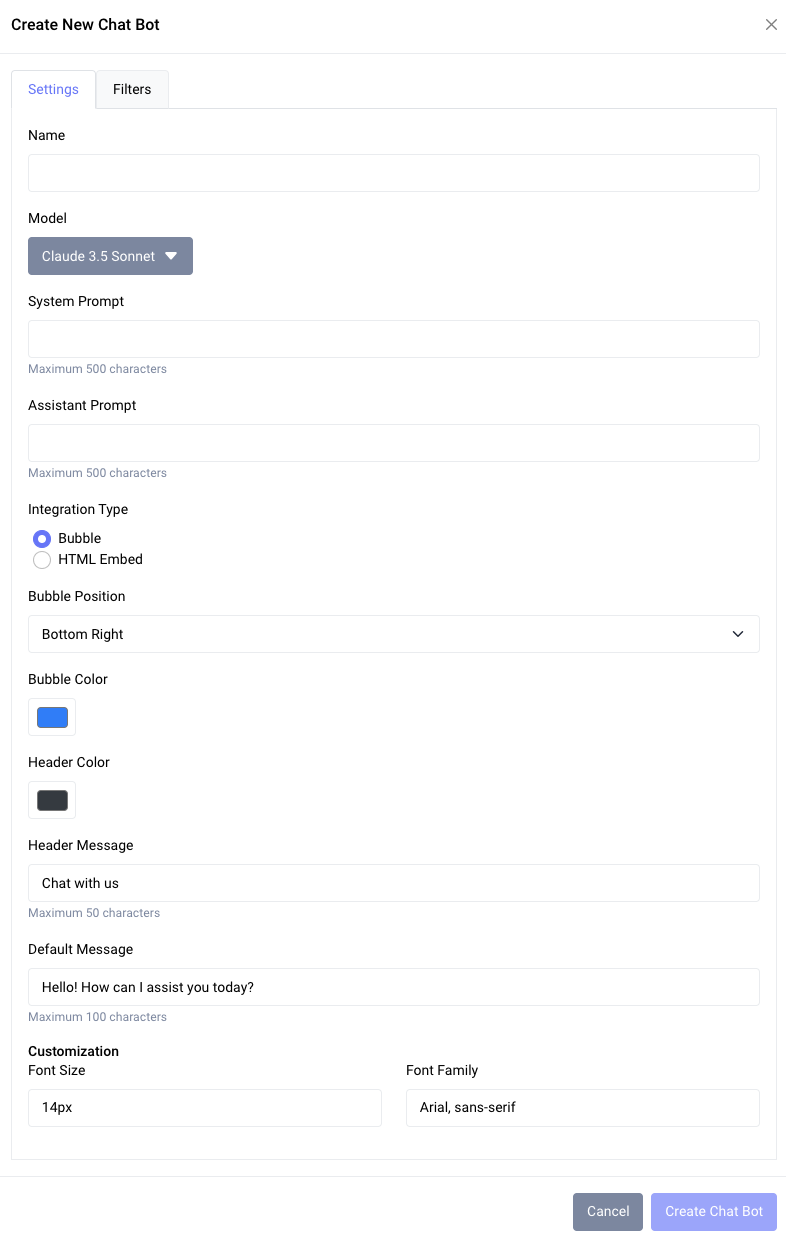
Carefully craft your system and assistant prompts to give your chatbot a unique personality and ensure it aligns with your brand voice. The prompt is the single most important factor in chatbot quality.
3. Create and Obtain Your Chatbot Key
Once you have configured all the settings to your satisfaction, click "Create Chat Bot" to generate your new AI assistant. After creation, you will receive a unique Chatbot Key - this key is essential for integrating the chatbot into your website.
4. Integrate the Chatbot into Your Website
Add your chatbot to any website by inserting a small script at the bottom of your HTML pages:
<script src="http://<strongly host>/api/v1/chatbot"></script>
<script>
  StronglyAI.init('<Your Chat Bot Key>');
</script>
Replace <strongly host> with the appropriate Strongly.AI host address, and insert your unique Chatbot Key where indicated.
Important: Always place this script at the bottom of your HTML body to ensure optimal page load performance. The chatbot widget loads asynchronously and will not block your page rendering.
Supercharge Your Chatbot with RAG
To make your chatbot truly intelligent and up-to-date, Strongly.AI offers the option to use RAG (Retrieval-Augmented Generation) enabled models. This powerful feature allows your chatbot to access and utilize relevant information from your website content or any other data you choose to make available - ensuring responses are always grounded in facts.
Standard vs. RAG-Enabled Chatbots
Standard Chatbot
General-purpose AI responses
Knowledge
Limited to the model's training data cutoff
Accuracy
May generate plausible but incorrect answers
Customization
Personality tuning via prompts only
Best For
General Q&A, creative tasks, basic support
RAG-Enabled Chatbot
Grounded in your actual data
Knowledge
Always up-to-date with your latest content
Accuracy
Responses grounded in your verified data sources
Customization
Deep domain expertise from your own content
Best For
Product support, knowledge bases, domain-specific Q&A
How to Enable RAG for Your Chatbot
Select Your Data Sources
Choose the content you want to make available to your chatbot - website pages, product catalogs, FAQs, knowledge base articles, or internal documents for employee-facing bots.
Ingest and Process
Use Strongly.AI's data ingestion tools to upload and process your selected content. The platform handles chunking, embedding, and indexing automatically.
Create Searchable Index
The system creates a searchable vector index of your content, optimized for fast, accurate retrieval during conversations.
Configure RAG Model
Select the RAG-enabled option when configuring your chatbot model. Link it to the index you just created.
Test and Refine
Run test queries to verify your chatbot is effectively using the ingested information. Refine prompts and data sources as needed for optimal results.
Pro Tip: Regularly update your ingested data to ensure your chatbot always has access to the most current information. Strongly.AI offers automated update schedules to keep your knowledge base fresh with minimal effort.
Advanced Customization and Best Practices
Tailoring Your Chatbot's Personality
The system and assistant prompts play a crucial role in defining your chatbot's personality and capabilities. Effective prompt engineering is the difference between a mediocre chatbot and one that feels like a natural extension of your team.
- Be specific about role: Clearly define the chatbot's role and the type of information it should provide.
- Set the tone: Include guidelines for tone of voice and communication style that match your brand.
- Define boundaries: Specify any limitations or topics the chatbot should avoid discussing.
System Prompt Example:
You are a friendly customer service assistant for TechGadgets, an online
electronics store. Your role is to help customers with product inquiries,
order status checks, and general support. Always maintain a positive and
helpful tone. If asked about prices or stock, encourage the customer to
check the website for the most up-to-date information.

Assistant Prompt Example:
Hello! I'm your TechGadgets assistant. How can I help you with your
tech needs today?“The best chatbots do not try to be everything to everyone. They excel in a well-defined domain, delivering consistently excellent responses within clear boundaries.
Optimizing Chatbot Performance
To ensure your chatbot provides the best possible user experience, follow these best practices for ongoing improvement.
Regular Knowledge Updates
Review and refresh your chatbot's knowledge base regularly to keep information current and accurate.
Monitor Chat Logs
Analyze conversation patterns to identify common queries and improve responses over time.
Clear Call-to-Actions
Use strategic CTAs within conversations to guide users towards desired outcomes and conversions.
Human Handoff
Implement direct escalation to human agents for complex inquiries the chatbot cannot resolve.
Ensuring Security and Compliance
Security is not optional - it is foundational. Strongly.AI provides robust, built-in security features to protect sensitive information in every conversation your chatbot handles.
PII Filtering
Automatically detect and redact personally identifiable information such as names, emails, phone numbers, and social security numbers before they reach the model.
IP Address Protection
Prevent the exposure of user IP addresses in chat logs and model inputs, maintaining user anonymity.
Custom Data Filters
Set up additional filters for industry-specific sensitive data - from healthcare records to financial information.
Compliance Ready
Built to support GDPR, CCPA, HIPAA, and other regulatory frameworks right out of the box.
Compliance Tip: Always ensure your chatbot usage aligns with relevant data protection regulations such as GDPR or CCPA. Strongly.AI's guardrails help you stay compliant, but it is your responsibility to configure them for your specific jurisdiction and industry.
Elevate Your Customer Engagement with AI
Creating a chatbot with Strongly.AI opens up new possibilities for enhancing customer engagement, streamlining support processes, and providing round-the-clock assistance. By following this guide, you have taken the first step towards implementing a powerful AI assistant that can change your online presence.
The key to a successful chatbot lies in ongoing refinement and adaptation. Regularly review your chatbot's performance, gather user feedback, and make iterative improvements to ensure it continues to meet and exceed your customers' expectations.
As AI technology continues to evolve, chatbots will play an increasingly crucial role in business-customer interactions. Stay ahead of the curve by using Strongly.AI's advanced platform to create intelligent, responsive, and personalized chat experiences - all with enterprise-grade security built in from the start.
Ready to Build Your AI Chatbot?
Experience the power of AI-driven conversations with Strongly.AI's chatbot creation platform. Start building your custom chatbot today.
Schedule A Demo